
14 lessons from a non-conformist designer
The most important things I learned in 5 years as a building services engineer — scope, BIM, value delivered, and what I changed to stop drowning.
 41 min read
TL;DR
Five years in Brazil’s building services market taught me the sector is broken: BIM became theater, design became bloated documentation, and a five-year engineer takes more blame than praise. I gathered the 14 lessons I learned the hard way — non-negotiable scope, ghost briefing, minimum viable info, “am I being paid for this?”, and why the tool matters less than you think. It isn’t a closed manual: it’s an invitation to break the cycle with me.
An ugly truth
Six years ago, I sat down at a computer to draft my first project, with no idea where it would take me. If someone from the future had told me that, in my first year, I’d work on more than 20 projects, become the technical lead in building services, and after five years I’d already have worked at large firms serving the country’s biggest builders, I would’ve been proud — the dreamer in me believed that. But what I never could have imagined is that, at this exact moment, I’d be staring at an ugly truth. Everything is wrong in the building services market and, as a great colleague keeps repeating to me.
“Building services are the great cancer of construction in our country.”
We need to evolve…
Companies that promise “Ferraris” but can’t even deliver a “VW Beetle.” Project teams where almost no one bothered to read a single catalog. For most players, BIM has become a comfortable lie everyone repeats to feel better, while most clients have no idea how to extract real value from their projects.
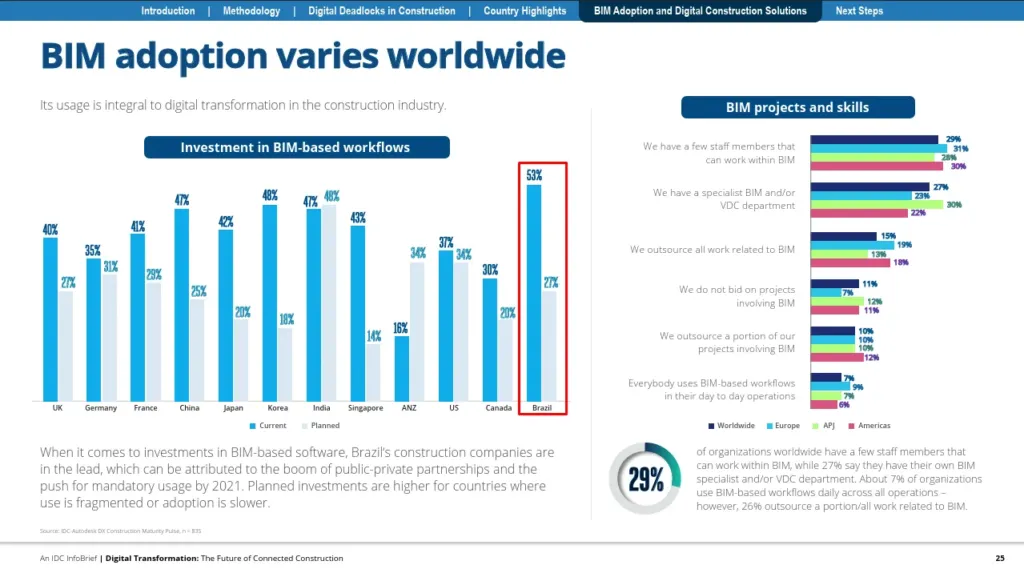
Digital Transformation: The Future of Connected Construction, Autodesk.
According to Autodesk, Brazil leads the world in BIM investment — and the result? Delays at every stage of every development, cost estimates that never hold, and overworked designers facing extreme hours. Right about now, you must be asking yourself: who’s the villain?
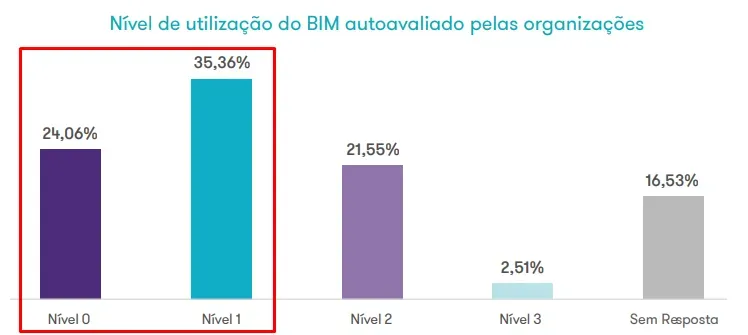
My answer might not please you: all of us. It’s in our DNA — the famous “Brazilian way” of being scrappy, resourceful, fixing everything on the fly, masters of solid workarounds. But that doesn’t favor us when we have to build complex, profitable buildings. It’s well past time to evolve our culture of construction management and planning. Look at some data from the BIM Maturity in Brazil survey, conducted by GrantThornton, Sienge, and ABDI (the Brazilian Industrial Development Agency).
Despite the substantial public and private investments, 59.42% of organizations rate their BIM maturity at the lowest levels — setting aside a significant 16.53% who didn’t respond — while only 2.51% reach the top tiers.
Mapping: BIM Maturity in Brazil.
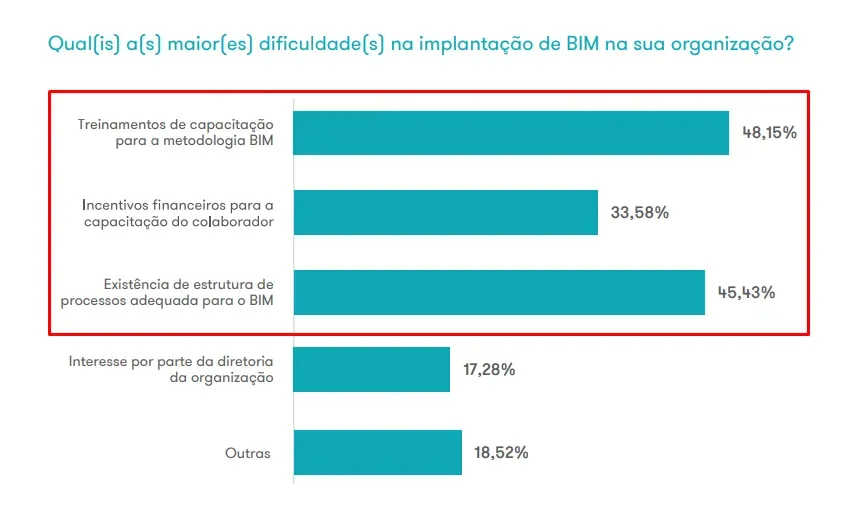
My gut feeling was that the issue was lack of management commitment and investment, but the reality is only a small share of companies face that kind of problem.
Mapping: BIM Maturity in Brazil.
You might think the survey is biased — only directors might’ve answered it. So here’s the role distribution of respondents, draw your own conclusions.
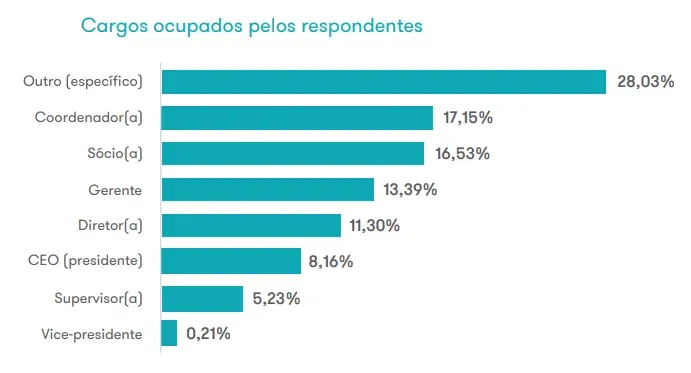
Mapping: BIM Maturity in Brazil.
I don’t know about you, but I don’t want to practice my profession in a frustrating scenario, with mediocre outcomes and returns. We work in one of the most important sectors in the country and yet, we’ve become a punchline in the collective subconscious.
”Engineers are trained to do anything except engineering… It’s all engineers driving Uber, that’s how we are…” — Renato Albani
Renato Albani says a divine sign made him quit engineering to be a comedian (Band, in Portuguese)
Don’t get mad at Renato or at the public — they’re right, and the situation is, in fact, comical. Thousands of cultural and political reasons brought us here, and the comedy or the memes are just a snapshot of reality. And it’s up to us to change that reality.

Pulled from Reddit.
And the most contradictory part: while thousands of trained engineers work in other fields and don’t practice the profession, companies in the sector face a critical shortage of qualified professionals. FGV reports that, in 30% of companies, lack of skilled labor is the main problem — yes, the main one. Think about it: the share of companies struggling to find qualified people is even higher.
Shortage of specialized workers affects construction (ABECIP, in Portuguese)
The quality of education in our universities is one of countless villains in this scenario. Beyond the obvious — outdated formats, curricula misaligned with the labor market, lack of practice and depth in the content — to my surprise, I found out that during our undergrad we study on average 3,500 hours, which is only half the time a student at the Polytechnic University of Milan (Italy) puts in: 7,600 hours, a 52% gap. Those numbers came from architecture programs, and given the parity between architecture and engineering programs in Brazil, it’s reasonable to assume engineering looks similar.
Training in construction: challenges and new formats (CTE, in Portuguese)
Now that you see the same picture I do, in summary:
- Resource waste;
- Projected billion-dollar losses in the sector;
- Shortage of competent professionals;
- Disinterest in upskilling among our peers;
- Recent grads completely unprepared, without the foundation needed to grow;
- A mass of bad professionals who repeat surface-level talk – BIM this, BIM that, LOD, LOI, BEP, Digital Twin, IFC, OpenBIM, buildingSMART… – but can’t sustain a two-minute conversation about why or how to use any of those concepts, delivering no real results and deceiving those who buy into the promises.
I hope you understand my motivation for sharing the most valuable lessons I’ve gathered over these years. If you also want to break this cycle and grow alongside me, open your notepad or your Notion, keep an open mind, and let’s go!
14 lessons from a non-conformist designer
First, an important note: what you’ll see here is not absolute truth and isn’t carved in stone. I’m fully open to debating each of these ideas, refining them, or admitting I was wrong. I want to encourage you to share your view, push back, or build on these takeaways so we can grow together.
0. Not every client is for you
Throughout my journey, I’ve talked to many designers who claim it’s impossible to adopt some of the documentation or design workflows I’ll cover here, saying “reality is different.” I agree we have to be flexible — but there must be non-negotiables in how you work, because if they’re skipped, they’ll bite hard later. It’s on you to recognize that some people shouldn’t be your clients, since problematic clients aren’t profitable.
No briefing, no requirements gathering, no defined approval stages, no one in charge of communication and support to the design team — those are some of the ingredients of chaos in a design office. That chaos shows up as revisions driven by personal preference, last-minute changes, and meetings to discuss solutions after all the documentation has shipped. It destroys your margins and your sanity. The hiring process should be a two-way street: you adapt to the client, and you validate whether the client fits you.
The moment you treat certain things as non-negotiable — and the value they deliver to your client — is the moment you can actually enforce them. I say this with conviction because that’s how I built my career, implementing strong project workflows with requirements gathering, partial deliveries, approval cycles, cross-discipline coordination during development, and acting as the alignment bridge with builders, architecture firms, and the client. All of that, for the most part working from the state of Sergipe and charging well above the market average. In my naivety, I thought we were doing the basics and wanted to learn from the big shops. When I got there, I saw the reality was different. Don’t think it was a smooth ride: I made plenty of mistakes too, and most of what I want to share with you was born exactly out of those mistakes.
1. What you deliver to your client is not a project
What the client receives is the project’s documentation; the act of designing comes before that and goes well beyond it. The “project” is the definition of how the building services will actually be executed in the future. Don’t get me wrong: documentation is extremely important, but project quality is not defined by it — after all, a bad solution, no matter how well documented, has zero value. At best, the site foreman will hand it to his daughter as a coloring book.
To illustrate, let’s go back to the origin of the word “project,” from the Latin projectus, meaning “intent to make or do something.” That intent is the real value of your work: defining solutions and validating possibilities that will transform the development.
That’s exactly where you should focus your effort — designing the most appropriate solution, not documenting every tiny connection on a sheet. Note the emphasis on “appropriate,” a concept we’ll go deeper into in lesson 4. In short, it’s far more valuable to your client that you spend your time finding the solution than getting tangled in the minutiae of documentation.
2. Learn to design before you learn to document
This lesson builds on the previous one: if you’ve understood that the most important part of a project is developing solutions — that is, figuring out how to take water from point A to point B — then it’s logical that your biggest effort should go into building a robust repertoire of solutions. That means learning from other people’s mistakes, studying different technical catalogs, and experimenting with a variety of materials.
Understanding which standards apply to each solution is essential — and although that regulatory side is fun to debate, we’ll go deeper into it in the next chapter. In short, building an arsenal of solutions and knowing how to pick from it is far more valuable than learning to model a standardized bathroom in two minutes or tagging an isometric.
Beyond the fact that those skills will be the first to be automated — I’m working on it, by the way — believing you’re saving time is a seductive illusion. While you might save a few minutes on documentation, you can lose hours or days on revisions requested by the boss or client during approval, plus the absurd mental energy spent on insecurity, asking yourself throughout the project whether what you’re doing is appropriate or not. Be very clear about this: you don’t want to spend time reviewing solutions, and that rework eats into your firm’s profit.
3. Be deep or pay the price: master the technique
If you’re not just starting out today, you know expectations on a building services engineer are high. People want safety and the feeling that you master every option for solving a problem, with convincing arguments that the proposed solution will meet their expectations. Memorizing which solution is best in which situation can be simple, but understanding the client’s wishes and being able to argue the pros and cons of each choice is the real challenge.
Examples, stories, laws, decrees, normative guidance, and case studies are the ingredients that win the client’s trust. Let me share something I went through: while working on high-end residential projects, a client asked me, “I’ve lived in many houses and built a few, but I’ve never seen an electrical project as expensive as this.” She was referring to the safety equipment and the cost of the wiring we specified. Even though electrical is my weakest discipline, I got the message. I asked her where she had lived, and she said: “In the interior of the state.” That was exactly what I needed to win her over.
I replied that, indeed, in most homes in the interior, projects aren’t done by engineers, and we end up considering all sorts of strange things normal — and asked: “Don’t you think it’s strange when, as soon as you turn the shower on, the lights flicker? Or that you can’t run another appliance with the shower on without the breaker tripping? Have you been through a short circuit that ended in burning wires or smoke? Have you lost a TV or fridge to electrical issues?” The answers were yes, and I explained that we size every component to demand and intended use, ensuring that, in her daily life in the home, she wouldn’t face those problems or put her family’s life at risk from an electrical surge or fire.
I didn’t go deep on the technical side, but during the conversation I detailed why we used larger gauges and why specific protection devices matter on certain circuits. Now, imagine if I didn’t know how to size a cable gauge, the safety guidelines for wet areas, or how equipment demand impacts the system. I wouldn’t be able to tie that knowledge to my practical experience and I wouldn’t convince the client our solutions matched her expectations. That would result in embarrassment and turn the couple into critics of our project. But in this case, I’m sure she became our biggest advocate. On every later visit to her construction site, our solutions were properly executed by the team, and she even asked us to instruct the builder so our project would be implemented in full.
Now you can see why reading the standards, understanding sizing, the manufacturers’ guidelines, and studying the pros and cons of each decision is essential to win clients over. I like to think there’s no right or wrong solution — each option is a tool that can be used depending on the client’s situation: some seek comfort, others safety, most economy. So you pick the tool that best meets their needs.
It’s important to note that I do not include in my toolbox solutions that could put users’ lives at risk or that don’t meet the minimum normative requirements for comfort and durability.
But all of this can become a trap — and that’s what we’ll cover in lesson 4. Let’s go.
4. Don’t assume you know what’s best for the client
Pause and reflect: how many times did you think you really needed something, believed it would be the best for your life, and after a while realized you were dead wrong — or didn’t even know what outfit was right for the occasion? Easy example, right? Now answer me: if you can’t be sure what’s best for you, how can you possibly think you know what’s best for your clients?
The answer is simple: it’s impossible. Your mission, throughout the project, is to understand what the client values, identify the variables impacted by each decision, present the possible paths, and show the upsides and downsides of each choice. In other words, you have to find the most appropriate solution for the current situation, knowing that requirements can change from one job to the next.
How do you achieve all that with a brief or requirements gathering? I know not every client is willing to fill in a doc or sit through a long meeting. That’s why I recommend having a base format and several alternatives: it can be a form, a spreadsheet, a text doc, or even an app, that lets you collect info gradually. As a last resort, for harder clients, keep the so-called “ghost briefing” — where you collect the essentials over WhatsApp conversations or calls, asking critical questions occasionally; they don’t know they’re answering a brief, and you have everything you need.
What can’t happen is you ending up with no idea what the client really needs, because that leads to countless headaches with revisions, calls questioning your choices, and at worst, serious problems on site.
Don’t get me wrong: I’m not saying we should blindly follow the client’s orders or that they should make every decision. Often the client doesn’t know what they need or might be wrong in some decision. Your role isn’t to outsource design decisions, it’s to understand which final product the client wants, identify the paths to get there, and guide them through it.
When the client knows what they want and the chosen solution is appropriate — or has no significant impact — the path is simple: go with the flow. But when the client has the wrong picture, that’s where we show our value.
A real story: in one development, the area suffered from frequent water shortages, and the client decided he wanted a giant reservoir — enough for nearly a month of consumption. That requirement significantly impacted the design, since the architecture didn’t allow for that volume. In our process, we caught the requirement and, instead of dismissing it, we presented alternatives. We studied consumption from a similar property, analyzed the feasibility of sizing the reservoir, and detailed the additional care and systems needed to keep the water potable. Even though water outages in the region usually lasted only one or two days due to utility rationing, we offered three options, listing the upsides and downsides of each, and made our recommendation clear. In the end, the client chose a reservoir that covered three days of consumption, with no extra treatment needed. What hit hardest was seeing the consumption comparison from the other property — something that, to me, seemed obvious, but that he hadn’t analyzed. That was just one of many cases where I realized I was wrong about what the client would care about, or what was important to him, and therefore what he actually needed.
That’s why I never assume I know what’s best for my clients.
5. Develop the project WITH your client
It’s much easier to meet client expectations when they’re involved in the development process. That way, you create checkpoints for the client to validate each stage, and if something already approved needs to be revised, you have room to negotiate contract amendments.
For this to work, segment your deliveries: define a clear scope for each stage and make it very explicit that the project only moves forward after client approval. And even more explicit: if you have to revisit something previously approved, that rework will be billed. Of course, if the revision is your fault, even after approval, fixing it is on you.
I suggest establishing at least three stages: preliminary study, pre-executive, and executive. That alone significantly reduces unexpected revisions, because you’ll deliver the minimum information at each stage — don’t worry, you’ll understand more about that in lesson 8.
Ideally, adopt an even more granular approach, with phases like preliminary study, point layout, schematic design, pre-executive, and executive — and if your client works in another format or won’t accept that many deliveries, run all the stages internally for review.
Adopting this stance, you’ll spot and fix errors faster, minimize rework when changing solutions, and avoid having to redo the whole concept after the documentation is complete.
6. You will NEVER finish a project
- You will NEVER finish a projectWho hasn’t messed up trying to deliver the perfect project, or spent more time than you should on a stage just to feed your own ego or to challenge yourself to ship the best work? It’s very common for those who care about quality. I’ve made countless mistakes related to this — more than you can imagine. And most of my delays fall into one of three buckets: too much polish, solving problems I shouldn’t, or estimating less time than I should have.
My goal was that the current delivery should be the best of my life — but I had no idea how wrong I was. There are two big mistakes here: first, you can’t objectively define everything that needs to improve to make a project better than the previous one; each development is unique, and probably for different clients. Second — and worse — your client probably didn’t pay you to produce the best project of your life. But you’ll understand that better in the next section.
For a long time, I didn’t get a phrase a coworker kept repeating to me. Said in a comedic tone, today I see the depth of his words and what he was actually trying to teach me:
“You never finish a project, you give up.” — Yuri Santana
Ps.: If you’re reading this, it took a while, but you made it.
Don’t think I’m telling you to do half-assed work or never deliver more than agreed. What I mean is you’ll never reach perfection and you’ll never be able to do every cost study, route analysis, and solution debate you decided was needed during development. In every project I delivered, there were always points I wanted to come back to and study deeper. There was always a route that, even though “good enough,” didn’t fully satisfy me.
And here’s our mantra: “Is it good enough?” The solution has to meet the client’s expectations and stay within the available budget. Remember every hour spent on the project has a cost. Knowing the maximum number of hours per project is critical — and that’s not the same as the days agreed with the client. If the deadline is 90 days, that doesn’t mean you’ll spend 90 days designing. Put this at the top of your priorities: when signing a contract, be clear on how much it will cost to produce the project and what profit you intend to make. Project cost is 80% labor hours; if you don’t control that, you know the rest…
That’s why at some point I understood I’d never actually finished a project — what ran out were the available resources. Even so, most of them were good enough to leave the client extremely happy with the quality — even if, internally, I wasn’t fully at peace with the result.
7. Constantly ask yourself: am I being paid to do this?
In my experience as a designer — and also consulting and training other professionals — I identified three phases in an engineer’s behavior as we evolve and gain experience. At the start, many think: “I can do this,” repeating the idea, either as a question to their lead or as self-affirmation when they need to solve a new challenge. That’s natural early on and shouldn’t be a worry.
After a few projects, the mindset shifts to “I should do this,” whether asking the lead or telling yourself. At this stage, be careful, because this stance can take us down dangerous paths. For example, imagine you’re in the executive phase, producing all the sheets and documentation, when an email comes in from the client saying that, due to a structural issue, some risers need to move. If you ask yourself: should I do this? One side of you will say yes, fooling yourself that it won’t be that much work and that it’s your DUTY to deliver a great project and solve the client’s problems. That’s the trap of “I should do this”: this stance carries a lot of nuance, and acting out of obligation can lead to emotional decisions, without weighing all the consequences for delivery and product profitability.
In the third phase, after several experiences in which you sacrificed your time just to fulfill the “duty” — and noticed that, no matter how much you please the client, they always want more — we finally start asking the right question: “Am I being paid to do this?” Here, the question is whether that task is actually within the contract scope, nothing more — it’s an objective stance. If the answer is no, it’s time to talk to the client and negotiate the terms to perform the activity, because we’re not doing volunteer work or running an NGO.
I know many fear charging amendments, picturing scenarios where the client never hires them again. But if your scope was well defined and reviewed with them, a reasonable client will simply negotiate the price. If they react over the top, alleging they didn’t know, or that they disagree, and you still don’t know how to act, go back to the start and read lesson 0, because you haven’t internalized it yet.
I’m also not saying you can never do favors or flex on minor matters for GOOD clients. In those cases, do it, but make it clear you’re doing a favor and that the activity wasn’t in the contract. Finally, I consider good clients to be clients who are profitable, not clients who are pleasant to chat with.
8. Deliver the minimum information
This lesson was a real game-changer for me. For a long time, I believed the more detailed the project — four or five views from different angles — the clearer it would be for the client and the more they’d value my work. The effect was the opposite: scattered, excessive information confused the site team, and when something needed revising, work became a nightmare because data had to be updated in many places.
Faced with that, I went on a journey of analyzing other people’s projects and talking to project consumers — site teams, builders, and developers — to understand the real needs of those who consume this documentation. I uncovered surprising things and adopted a few measures I’ll share with you:
- Essential Information: A big problem was unnecessary information for understanding a given phase. So I started including only the minimum needed for each project stage. For example, in the preliminary study, the legend showed only the elements relevant to that phase, instead of using a single legend for every stage.
- Standardized Organization: During my interviews, I noticed engineers never knew exactly where to find a given piece of information — it could be on the first sheet, on the floor plan, in a section, or in a detail. To fix that, we created a project reading manual: the first sheet clearly explains how the data is organized, so people know exactly where to look.
- Data Centralization: I worked to group all info for a floor on the floor plan itself, avoiding dispersion. If needed, additional info would appear on the next sheet, sequentially. No detail-only sheets at the end of the project — imagine a site engineer with hundreds of sheets having to remember which detail-sheet number goes with which floor, when we don’t even share a numbering standard.
- Classification and Uniformity: Organize and group information to eliminate duplicate identifiers, dimensions, or annotations. Each type of detail or document should have a predefined data set and a specific place to be presented. The rule is clear: no duplicate information. This uniformity not only points readers better — they learn to look in a single place — it also helps build an efficient consultation habit. With this approach, we save time in production and eliminate errors from divergent data. Imagine almost zeroing out questions of that kind.
- Master List: I adopted the practice of the “master list” — a simple but extremely powerful resource. Early on, as a designer, I didn’t see the need, since I knew exactly where every piece of info lived in my own projects. But once I started analyzing other professionals’ projects and talking to builders, I discovered the real value of this tool. With a master list, validating that all sheets are available at the right revision and understanding what’s in each becomes much more practical. To make adoption easy, I recommend a table with columns for: sheet number, content, file name, and last revision. That’s the structure I use.
While writing this lesson, I realized there’s a lot I’d like to explore on this topic — both the problems I identified and the solutions I adopted. I think the topic deserves a full article where I can cover more practical examples and share documentation patterns I use day to day. If you find it interesting, send me a message so I can gauge interest. For now, I hope this initial take makes you think about the importance of delivering the minimum information needed, saving time, and avoiding unnecessary complexity and divergent data.
9. The project isn’t made in the software
This was the moment everything connected for me: I understood the software is a powerful tool — capable of speeding up documentation, identifying clashes, and sizing components — but it doesn’t create projects. On the contrary, when we let ourselves drift into the autopilot of modeling, we focus on minor details and forget to solve the core problem. As I emphasized in lessons 1, 2, and 3, I see designing and documenting as very different things. And I believe software will never replace the designer’s reasoning and experience.
We all agree that mastering the tool you use is essential and saves a lot of time, but you know where a building services engineer saves much more time? When they develop the skill and confidence to analyze the architecture of a 20- or 30-story building, understand the client’s premises, and know exactly what needs to be solved at each stage. It’s about having the confidence to pick the right solution for each system, identify critical points in the architecture and structure, knowing when services should adjust to the civil disciplines or when those should be revised, having a well-organized knowledge library where you quickly find what you need, and imagining solutions for each part of the project in seconds. This skill, in the short term, can’t be replicated by any AI or software.
I can say with conviction that, as you train your reasoning and establish processes to guide your thinking, opening a floor plan or the isometric of a technical area becomes an incredible immersive experience. It’s almost instinctive — in seconds, your brain captures patterns and generates solutions, unconsciously, faster than you can even register; the project’s components start appearing before your eyes and connect with pipes and fittings at the same speed, and when you’re done you use the software just to document and validate your ideas, fixing whatever your initial imagination missed. It’s similar to using augmented reality, where building services projects appear over the environment — it’s truly an incredible experience, and a game-changing skill, when we set out to solve a space without depending on visualizing the modeled elements, without Revit, QiBuilder, CAD, or even a sketch. Just you and your mind in action.
Adopting this path was a turning point in my career. In meetings with clients, I could quickly think of three or four solutions to the same problem, with no sketches or modeling, or even visualize the client’s proposal from description alone, anticipating clashes with other disciplines. That’s the skill I consider extremely valuable.
If you haven’t experienced this feeling yet, start training: observe the space you want to design and let your mind work without software or sketches. If imagining the entire space is too hard, break it into pieces or use disposable sketches in a drawing tool or on paper. Develop this capacity and watch how it transforms your experience creating projects.
To go deeper into this topic, I have a really good post on my Instagram — also on LinkedIn — where I explain in more detail the methodology I use to stay focused during project modeling. I’m sure it’ll help you grow this skill.
10. The tool you use to develop your projects doesn’t matter
This may sound controversial, but the truth is simple: the only time the tool truly matters is when it’s an explicit client requirement — for instance, using Revit for environments integrated with ACC (Autodesk Construction Cloud). Outside of that, if someone says you have to follow a single platform or that some tool is best in every scenario, I recommend you don’t listen, especially if that person is selling you a course on the tool.
In normal situations, what matters most is choosing the tool that makes your process more efficient without compromising quality. After all, your client rarely cares about “how” you got to the result — they want a proper project, delivered as fast as possible at the lowest possible cost, both in production and in construction. To illustrate, think: have you ever seen an electrician using only one type of pliers? Or a bricklayer with a single trowel? Likewise, a mechanic rarely settles for a single wrench. Different tools solve different problems.
Now reflect on the implications of clinging to a single tool:
- Excessive Specialization: Mastering every aspect of one tool can speed up your processes within its limits, but that specialization can become an obstacle if more efficient solutions appear. Imagine you’re an expert and you can document an isometric in 10 minutes, while average users take 30 — agreed, that’s an incredible feat. But what if I told you that, meanwhile, an average user of another tool does the same in 5 minutes? It’s not a hard scenario to picture, or impossible to happen. Isn’t it worth exploring other options?
- Vendor Dependency: Centralizing your entire career or operation on one tool makes you vulnerable to the vendor’s decisions. Whether due to policy changes, price hikes, product sunsets, or even your employer switching vendors, that dependency can hurt your productivity and, in extreme cases, your job or business.
I myself was wrong on this for years. I focused all my efforts on a single tool, and I’m aware that, especially early in your career, focus matters — but not to the point of excluding experimentation. Spending most of the time in one direction can build a solid foundation; I repeat, most of the time. But carving out space to explore new solutions brings enriching perspectives. Even using Revit, I noticed that experimenting in other areas of the same tool, like architecture and structure tools, significantly improved my MEP processes.
Beyond all that, there’s a growing trend with the Open Source movement and, in our area, Open BIM, where the focus is on open file formats and open software. That approach offers benefits like no fees, more customization, the freedom of not being locked into a single vendor, and if the project gets discontinued, you can keep your version going.
I recommend the following process for choosing tools: research as many options as possible for your area, watch videos, talk to colleagues and read their opinions. Build a “toolbox” — a record of solutions you’ve found and the problems each one solves. Test and compare alternatives, understand each one’s strengths and limits, then adopt the best options into your workflow.
Today I follow this approach and recommend you do something similar: have a primary tool, complemented by others useful in specific contexts, and at least one Open Source alternative. For example, in IHS projects I use Revit for more complex projects that need a lot of customization, but I adopted Qi Builder for more traditional ones. Although I was initially a Qi Builder “hater,” I discovered — through colleagues’ reports — that it’s extremely optimized for the local market and brings significant productivity gains in conventional cases; analyzing residential project times, I found I was taking twice as long as my colleagues, and that’s what motivated me to try it. However, when projects demand more customized solutions, Qi Builder’s flexibility falls short, forcing me back to Revit. This stance may shift over time as new tools emerge and my needs evolve. On the Open Source side, I’m trying a few options, but none has wowed me yet. I also want to explore Bentley’s tools, mainly for infrastructure projects.
Recap: master a tool, but don’t shut yourself off from possibilities. Get out of the comfort zone, test new approaches, and broaden your repertoire — and your arguments — to choose the best tool for each situation.
11. You probably don’t work with BIM
Don’t take just my word for it — trust Building Smart. The organization defines BIM as “a collaborative process that uses a shared digital model to represent the physical and functional characteristics of a built asset.” That model isn’t limited to 3D graphic representation; it integrates detailed information on materials, systems, costs, schedules, sustainability, and other essential data to support decisions across the building’s lifecycle.
Reflect on each part of that “surface-level” definition of BIM and ask yourself: do all the projects sold as BIM fully meet those requirements? Once we go deeper into the technical and methodological aspects, the reality gets way more complicated.
I don’t want to generalize. Maybe a small share of our market really extracts value from the BIM methodology. But the vast majority don’t. They sell a fantasy: many try to fit BIM into a “mental chess board,” inventing dimensions and requirements to prop up their product. But under cold analysis, the reality is different. A model with a nicely modeled water booster pump, accurately reproduced from a manufacturer’s reference, can be cool — but without the essential data for planning, maintenance, budgeting, construction, and operation, it says nothing. Likewise, a project whose final deliverable is a PDF and CAD sheets with “more or less accurate” quantities, that the client doesn’t trust for budgeting and ends up needing fully redone by quantity surveyors, also isn’t BIM.
Even acknowledging that there are different levels and goals, the message I want to send is simple: the biggest beneficiary of a BIM project flow is the client — they’re the one who can extract value from the information and make things happen. When there’s no clear goal for the models — no defined level or information standard requirements — the model’s data will hardly be used. In practice, what most clients want are CAD and PDF sheets and Excel sheets with approximate quantities. Why worry about a BIM model packed with precise details if you don’t even know upfront which brand or spec your client intends for each system? And, above all, have you analyzed whether your client is willing to pay for that level of information — why invest time and energy on something that won’t make a difference?
Let me invite you to reflect: wouldn’t it be more interesting to spend time on the project’s solution itself, rather than chasing a perfectly modeled water-heater family that matches your spec? Why not use a parametric rectangle that lets you adapt size and connection positions as needed, instead of spending hours on complex libraries and overly specific components?
Unless your client can extract real value from BIM and is paying for projects that follow their guidelines, it may be more advantageous to invest in improvements in the areas they actually use, so they trust the material you’re delivering. In the end, that approach over the years moves you toward a real BIM workflow, instead of settling for half-assed documentation, dropping a quickly exported IFC into Google Drive and pretending the project is coordinated, without a single message to other stakeholders.
I’ve talked to many professionals who use our projects and discovered that, in practice, the priorities are very different from those our designer “bubble” celebrates. I’m not saying project representation or BIM are disposable; I just believe that, for most developments in our market, they’re not a priority and can be a waste of resources. If the client doesn’t have a well-defined marketing strategy, a realistic render or a high-quality view rarely brings practical value — picture a site engineer holding a printed sheet with your hyper-realistic detail saving more than the cost spent producing it. Likewise, an IFC file with flawless geometry that, when the engineer goes to check a water booster pump’s spec, is different from the spec on the sheet, doesn’t inspire much trust nor encourage our project consumers to seek that out.
Finally, talk to your client. Understand the real informational need, the use they intend for the model, and how their team will use the projects. Direct your effort to deliver value where it’s actually needed, instead of producing “disposable” information.
12. Beauty is expensive and your client may not want to pay for it
Just as your client may not be willing to pay for all the information a BIM model offers, they may also not value high-fidelity realistic renders, excessive detail levels, or projects with painstakingly detailed geometries. Remember: every additional element in your project has a cost — whether in modeling hours or in time lost to overloaded computers and crashes.
The experience is common: who hasn’t seen Revit crash trying to edit a component or adjust a material, wasting hours of work? That extra cost can’t be ignored. If you don’t pass it along to your client, your margin takes the hit.
So make sure the client recognizes the value of how the project is presented, that the information has real utility, and that they’re willing to pay for that level of detail. A smart alternative is to develop differentiated products — that is, projects with different development standards to fit each client’s needs, without producing unnecessary information. I remember a case where just modeling the project, with no documentation, perfectly met the builder’s needs; in another, the builder needed the project only for the machine room and the point layout. In both cases, we significantly reduced the contract value, which became a key differentiator for the hire, because it covered exactly what was relevant for those developments. I see that giving a discount is never an option when you control your production cost — to lower a specific contract’s cost, the only alternative is to change scope. And those scopes solved the client’s problem; even if I wouldn’t have made the same call in their place, I can’t assume I know what’s best for them.
I won’t drag this out, since we already covered disposable information at length in the previous section.
13. Get off the pedestal: your project won’t be read by royalty
Most people I talk to have never paused to think about who actually uses their projects. Do you really know the audience for your work? Who are the people who’ll consult them — only the site crew, or teams from other departments? What’s the lifecycle of your project, and which professionals benefit from it before it’s discarded?
Each of those questions has many acceptable answers. Users can range from pre-fab kit-factory teams to the “Valdomiro the plasterer” of the site, including professionals with very different education levels and needs.
At one point, I went looking for those people to understand how each one used my project. (Be clear: we’re not here to fix the whole world — we can only control what’s in our reach.) During those long conversations, I realized I was creating projects for an audience with high technical knowledge in building services, when in reality that group was the smallest share of users. I’m not just talking about specialists, but about quantity surveyors, site engineers, foremen, engineering assistants, and interns — people who, in the daily rush, don’t have time to study every detail of the documentation. They need quick answers: open, scan, decide.
That experience revealed three main problems faced by my project consumers:
- Limited Technical Knowledge: Many lack advanced mastery of building services.
- Scarce Time: The documentation has to be analyzed quickly, with no long study sessions.
- Low Formal Education Level: For some users, complex organizational systems, excessive acronyms, and multiple views can hurt more than help.
Faced with these challenges, I decided to reformat my projects to better serve users’ real needs. Some actions I took:
- Simple, Direct Language: Every piece of information should be presented as clearly as possible.
- Moderate Use of Acronyms: Use acronyms only when widely known or when full information would harm comprehension.
- Clean Sheet Visuals: Set standards that avoid visual clutter, showing only the essentials.
- Guiding Notes: Include directions pointing readers to where to find specific info, like “see sheet X” or “see detail Y.”
- Functional Floor Plan: The floor plan doesn’t need every detail — instead, it should guide the reader to where the necessary information lives, without overloading them with identifiers or unnecessary dimensions.
After adopting these changes and aligning my projects with users’ real needs, acceptance went up considerably. We started getting fewer complaints and pushback, precisely because we simplified and removed information overload. The secret isn’t adding more content, it’s identifying what can be removed without harming comprehension. After all, we can’t assume we know what’s best for the client — we have to listen and adapt.
14. Let the client taste the “cheese” for free
It’s time to learn from street vendors: who hasn’t tried a free cheese sample on the corner, loved it, and asked for half a kilo to take home? And the best part is we didn’t even leave the house to buy cheese.
Across this article, you may have gotten the impression that I’m against delivering more than the client paid for, or against adopting new technologies and innovations in projects. Not at all. I’m a huge fan of innovation, and delivering exceptional products that delight readers is in my DNA. I love realistic views, detailed models, and even meticulously laying out the position of every support or fixing base — it’s natural for designers to want to control every detail.
But after many frustrated experiences, I learned we can’t compromise deadlines or margins by throwing in extras for free. Overdelivery — the extra effort to improve the project — should be treated as an investment in the client relationship, not as something routine and uncontrolled.
Back to the cheese: the lesson is this — the best way to deliver value is to offer a small sample for the client to try. You don’t need realistic, painstaking detail on every sheet of every discipline, QR codes with construction guidance on every detail, or 360 visualizations on every model view. The right approach is to apply those improvements selectively, showing the client there are new possibilities and that you can provide them. Let the client see, try, and decide whether, next time, they want to take the whole package.
Beyond seeding those “hooks” in the project, it’s essential to encourage and guide the client on how to use those features, and especially to gather feedback. That practice creates much more openness for new products and generates “spontaneous” demand, free of suspicion, based on the perceived value of the innovations.
So yes, you can — and should — propose improvements, add new tech, and delight your client. Just be careful not to do it for free or turn that “surprise” into a contractual obligation, in which the client pays for something that, in the end, doesn’t bring real benefits.
Conclusion
I loved writing this article. It started as a script for a 10-minute video for my YouTube channel, but as I explored the topics, I saw how much we could go deeper on the discussion. I ended up turning it into an article — though I had to compress some sections to keep it from getting too long.
It’s clear our field is full of important topics that often aren’t openly debated. I plan to go deeper into many of the topics raised here — open source, open BIM, design standards, information standards, requirements gathering, deliverable level, contract scope, and more. If you’re interested in a specific topic, send a message or leave a comment. I promise to do thorough research and create dense content on the request.
We close here with the takeaways I consider most relevant from my career as a building services engineer. I hope some of them inspire you to evolve your deliveries — just as I learned a lot from other professionals’ experiences, I want to share mine so the next ones do the same.
I’m Pabllo Dantas, and this is my small contribution to the community.
Date of first publication, March 3, 2025.
References
Documents and Reports
- Digital Transformation: The Future of Connected Construction
- Mapping BIM Maturity in Brazil (in Portuguese)
News
- CNN: Bureaucracy and delays could cost construction R$59 billion by 2025 (in Portuguese)
- Grant Thornton: BIM Maturity in Brazil (in Portuguese)
- Renato Albani says a divine sign made him quit engineering to be a comedian (in Portuguese)
- Training in construction: challenges and new formats (in Portuguese)
- Shortage of specialized workers affects construction (Valor Econômico, in Portuguese)
Did any of these 14 lessons hit home? Which one did you need to read today? Drop a comment in Discord.