
How I Used AI in a Live Engineering Consultation
I ran a live hydraulic consultation using AI as a reasoning copilot, not an oracle. Two hours later: architecture defined, equipment specified, CAPEX estimated, technical document ready. The three-phase method.
 18 min read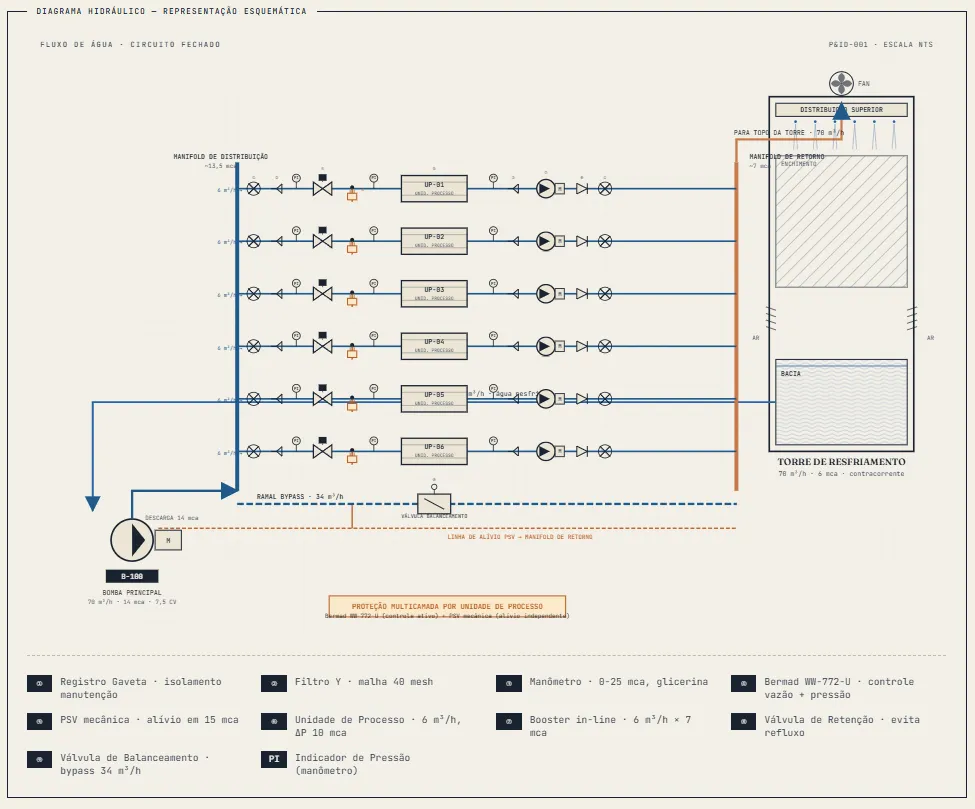
TL;DR
I ran a live hydraulic consultation using AI as an assistant tool and a thinking pad. Two hours later, we had the architecture defined, equipment specified, and a technical document ready. The method that worked rests on three pillars: progressive feeding, constant human filtering, and output in a format that actually works for the client.
Before you continue, an important note: the technical document below is the first version generated by the agent, without my review. I’m sharing this raw draft on purpose so you can evaluate the AI output quality directly, without any human intervention afterwards. Project-specific information has been hidden or altered to preserve client confidentiality. Further along in the post I explain exactly the errors I found during the review and how the final document ended up different.
The meeting that should have taken a week
Last week I was in a consulting session with a fellow engineer. She needed to solve an industrial hydraulic system that wouldn’t close: a cooling tower, multiple parallel consumers, tight pressure, mismatched flow rates. The kind of problem where you leave the meeting with a list of “let me think it through and get back to you.”
Instead, we left with the architecture defined, equipment specified, dimensioning validated at every critical point, and a technical document ready to take to the contractors.
It all sounds complicated, but I can assure you: there’s no magic here. Let me walk you through how I did it.
The problem that wouldn’t add up
It was a cold water recirculation system for industrial cooling: multiple consumers in parallel, fed by a single main pump, discharging into a cooling tower. The critical points:
- Maximum pressure capped at each consumer, with significant internal head loss at rated flow
- Cooling tower requiring its own flow rate and minimum pressure at the spray nozzles
- Pump flow above the sum of consumer demand, leaving excess with nowhere to go
- No hydraulic equalization between consumers
- 24/7 operation with the need to take individual consumers offline for maintenance
The basic math already showed how tight it was: after accounting for internal head loss at the consumers and the pressure required by the tower, only a tiny margin remained to overcome the pipe friction losses. It didn’t close.
In a traditional consulting engagement, this kind of problem calls for a diagnostic meeting, a few days of calculations, another meeting to present alternatives, and another round of refinement. A week at minimum.
What I did differently
I opened a conversation with a language model alongside the meeting, in a parallel window. Every time my colleague brought up new information about the system, I fed it to the model. Every hypothesis we discussed, I tested in dialogue. The model didn’t replace either of us; it accelerated the reasoning cycle.
But this only worked because I followed a specific protocol. Without it, AI in consulting just becomes noise.
The protocol that worked
1. The engineer frames the problem
I didn’t walk into that meeting thinking “I’ll use AI to solve this.” I walked in with the technical expertise and ownership of the outcome. AI came in as a reasoning accelerator, not an oracle.
All the initial framing: understanding what my colleague was dealing with, identifying the real constraints, separating the pressure problem from the distribution problem, that was human work. I already knew the shape of the answer before I asked for one.
2. Progressive feeding, not a one-shot prompt
The temptation is to dump the whole problem at once and ask for a complete solution. It doesn’t work. The model produces something plausible but generic.
What works: discovering the problem together. I started with the most obvious constraint (pressure budget), evaluated the response, brought it into the in-person discussion, then came back with the next layer (distribution across the consumers), evaluated again. At each iteration, the model refined its understanding and I tested whether the recommendation made sense against what I knew from field experience.
That back-and-forth is what allowed us to arrive at a solution specific to her system, not a generic pumping handbook.
3. I was the quality filter
At several points, the model gave me suggestions I rejected or modified:
- When it proposed an architecture with a pump repositioned to the suction side, I knew the plant geometry wouldn’t allow it. Discarded, moved on.
- When it suggested a static balancing solution, I pointed out that my colleague had mentioned partial operation: some consumers can go offline. That completely changed the valve specification.
- When it gave me product links, I asked to verify against official documentation before carrying the recommendation forward.
Every time I corrected, refined, or rejected, the conversation advanced. AI is good at generating options and structuring reasoning. The engineer owns the judgment.
4. Output in a format that’s useful for the client
At the end, I asked the model to generate a structured technical document: hydraulic diagram, equipment specification with suggested models, pressure budget validated point by point, operational scenario analysis, investment estimate. Not to deliver as-is, but as the base for my final technical review.
Five minutes of generation. Compared to two full afternoons of manual work, that’s a material difference. And the content was mine, just organized, formatted, with the diagram rendered.
What we walked out with
We left with:
- Architecture defined: main pump, individual in-line boosters per consumer, combined flow and pressure control valves, mechanical relief valves as a second line of defense, dimensioned bypass
- Equipment families suggested for quoting (industrial-grade combined valves, in-line centrifugal pumps)
- Pressure budget validated at every point in the circuit, with documented safety margins
- Analysis of seven operational scenarios, including individual equipment failures and partial operation
- CAPEX estimate for client presentation
- Open items list for project closure (field measurements, redundancy decisions, vertical layout)
All of that in a single meeting of roughly two hours.
The part nobody talks about: the review
This is where I need to be honest, because without this the rest of the article would sound like a sales pitch.
After the meeting, I sat down to review the documentation carefully. I spent about 30 minutes going through what had been produced and found errors. Components specified that weren’t needed for the final architecture. Redundant systems that had made it into the document but, on reflection, didn’t make sense. Suggestions dimensioned with excessive safety margins.
I removed the excess, adjusted what was wrong, asked the AI to redo sections with more precise instructions. The final document is different, and better, than what came out of the meeting.
But here’s the point that matters: even counting those 30 minutes of review, the final result was at a level of quality I could not have delivered by the traditional method. For one simple reason: time.
If I hadn’t adopted this workflow, what would I have delivered? Probably a Word document or a notes file with the main points. I would have walked my colleague through the missing details in another meeting. She would have had to come back with questions, or the client would have asked for data I hadn’t documented because “I didn’t consider it essential at the time.” The cycle drags on.
With this workflow, the deliverable became something else entirely: complete spec sheets for each piece of equipment, links to official datasheets, specific reference models, real data pulled from manufacturer documentation, an interactive hydraulic diagram where the person clicks and gets a dedicated detail section. Things I would never have had time to produce manually for a client, even knowing they would add value.
The summary is uncomfortable to admit but true: I invested less time and delivered a better result. And part of that “better” came precisely from using an AI assistant and providing all the system context clearly, instead of spending those hours building the document from scratch.
The review is part of the method, not an exception to it. Whoever uses AI expecting a perfect output is trusting an algorithm too much. Whoever uses it expecting a high-quality draft to refine, and holds themselves fully accountable for the result, is on the right track.
Where AI doesn’t work
To be honest about the limits:
It doesn’t work if you don’t have the underlying technical knowledge. At several points, I had to correct my AI assistant and redirect it because I already understood hydraulics. A junior engineer would have accepted the inadequate suggestions without noticing.
It doesn’t work as the sole source of specification. Every suggested piece of equipment had to be validated against real information before becoming a quote specification. AI is good at indicating product categories and likely models. Confirmation is manual.
It doesn’t work without the human engineer at the center. If the AI generated the recommendation and no one reviewed it with a critical eye, you just produced a nice-looking report that’s technically fragile. AI doesn’t understand project nuances and can’t balance all the variables to meet client needs and manage the risks of each decision.
How to apply this in your next meeting
For colleagues who want to try this, here’s the workflow distilled into three phases.
Phase 1: before the meeting
Load the agent with company context. This is probably the biggest quality leap available. If you have documentation of past projects, internal standards, technical norms your firm follows, recurring specifications, put all of it into a Claude Project (or equivalent). The difference between a generic response and a response in your firm’s standard is simply the context you provided upfront.
For projects with a BIM model, it’s worth creating automations to extract structured data (equipment lists, quantities, specifications) and feeding it into context. Revit plugins that export JSON, Dynamo scripts, IFC parsers: anything that transforms the model into text the agent can interpret.
Define the meeting’s goal before opening the AI. The worst way to use it is to arrive at the meeting and improvise. The best way is to know exactly what you need to deliver. The agent accelerates execution; it doesn’t replace technical qualification and field experience.
Phase 2: during the meeting
Use a platform with automatic transcription. Gemini in Google Meet, Otter.ai, Read.ai, Fathom: any tool that transcribes in real time. You stay free to talk with the client without taking parallel notes.
Swap the notepad for Claude. Every time a technical piece of information, hypothesis, or constraint comes up, you feed it in. This preserves the meeting’s rhythm: you stay engaged with the client, but parallelize the technical reasoning.
Don’t try to capture everything via AI. The primary focus remains the human conversation. AI runs in the background, complementing. If you get distracted chatting with the machine, you lose the meeting.
Phase 3: after the meeting
Feed the full transcript to the agent. This is where automatic transcription becomes gold. You drop the full meeting text in and ask it to generate: structured meeting minutes, open items with owners, decisions made, next steps with deadlines. In a few minutes you have the professional follow-up that normally takes a morning to write.
Reserve time for critical review. In my case it was 30 minutes. It may be more depending on complexity. The point is: never deliver what AI produced without running it through your technical filter. Errors will appear. Unnecessary components, oversized dimensioning, out-of-context suggestions. Your review is what turns a draft into a deliverable.
Ask for the final version in a format that works for the client. The format might be an interactive HTML document, a structured PDF, or a markdown file. You can ask for elements like a clickable diagram, a specification spreadsheet, a presentation. The agent delivers in the requested format. That’s the detail that separates “AI response” from “consulting deliverable.”
Workflow diagram
Other practices I use
Some practices I didn’t use in this specific meeting but that pay off in other scenarios:
Connect the agent directly to your tools. Claude supports MCP (Model Context Protocol), which lets you connect Google Drive, Notion, ClickUp, GitHub, and other sources directly. Instead of copying and pasting documents every time, the agent fetches what it needs on demand. For a consultant with an extensive project library, this changes everything.
Create persistent skills or instructions. Define once how the agent should format technical specifications, what structure your firm uses for technical reports, or which standards should always be checked. The agent then applies that automatically in every conversation.
Build a prompt library by task type. Equipment specification, meeting minutes, technical opinion, feasibility analysis: each has an ideal prompt format. Build that library once and save time permanently.
Cross-validation on critical decisions. For situations where an error is costly, it’s worth running the same question through two different models (Claude and Gemini, for example) and comparing. When both converge, your confidence goes up. When they diverge, that’s a signal to dig deeper manually before deciding.
Record internal team meetings too. Not just client meetings. Technical alignment sessions, scope definition, brainstorming: all of it becomes valuable context material for future projects if transcribed and archived in a structured way.
Document emerging patterns. Every time you refine a prompt and it works well, save it. Every time you define a deliverable format the client approved, save it. Over time, this becomes an operational knowledge system for your firm, replicable across projects and team members.
The point isn’t that AI replaces engineering consulting. The point is that it changed the pace of work. Before, I would have left that meeting with a list of tasks. Now I leave with the structured solution and the document ready for review.
The engineering still belongs to the engineer. It’s just that the time between the question and the answer shrunk from days to hours.
P.S.: for those who want to go further
If this idea of “feeding the AI with company context” caught your attention, there’s a path worth exploring: LLM Wikis, knowledge bases structured specifically to be consumed by language models.
The difference from a traditional wiki is subtle but profound. Instead of organizing information for humans to navigate through links, you organize it for the model to retrieve context on demand. Project standards, historical architectural decisions, recurring specifications, lessons learned, client memories, internal technical norms: all of it can become active knowledge for the agent.
The result is a consulting firm, or engineering department, where institutional knowledge is available in every AI conversation. Not locked in the senior partner’s head, not buried in a Drive folder no one opens, not gone when someone leaves the company.
It’s a new field, still forming. The terms to search for include knowledge graphs for LLM, RAG (Retrieval Augmented Generation), context engineering, and of course LLM wikis. Worth spending a few hours to understand: whoever builds their firm’s knowledge base first will have an operational advantage that’s hard to replicate.
That’s the invitation. The rest I’ll leave for you to discover.
Have you ever used AI live in a technical meeting? What was the bigger challenge: the model generating wrong things, or losing the thread of the client conversation while feeding the chat? Drop it in the channel.